Explained: How Touchscreens Work
It may come as a surprise to learn that touchscreens have been around since the late 1960s, when they were invented in the United Kingdom. Several years later in 1971, Dr. G. Sam Hurst, a professor at the University of Kentucky, developed a touchscreen prototype for computers called the “Elograph.” Their prominence, however, only took off with their use in the first iPhone in 2007 [1]. Since then, they have become ubiquitous, used in technologies ranging from laptops to shopping mall directories [2]. Touchscreens are so useful because they can be personalized and can be easily reprogrammed for different uses or languages [3]. Although touchscreens seem homogeneous, this article explores the various types of touchscreens and what they may be like in the future.
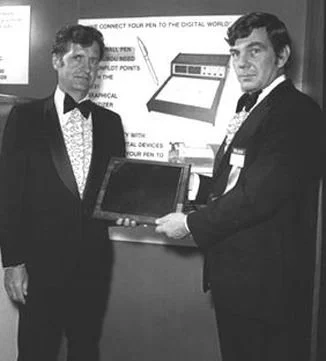
Figure 1: Dr. Hurst (left) with an early version of the Elotouch, a type of Elograph [4].
The Physics of Touchscreens
There are many types of touchscreen sensors: capacitive, resistive, infrared, and surface acoustic wave (SAW) technologies [5]. I will cover some of the main forms of touchscreens in this article, but explore other material, such as this video, for more information.
Capacitive Touchscreens
These touchscreens use the finger (or a conductive stylus) to manipulate the electric field around the screen, which exists because of an applied transparent conductive material. That material is often Indium Tin Oxide. Sensors on the edges of the glass screen pinpoint the location of the disturbed field, allowing the LED screen to adjust accordingly. Capacitive touchscreens are very responsive and durable, as there are no moving parts; however, they do not work with non-conductive substances (like gloves) and can be more expensive than other touchscreen sensor types [5, 6]. These are common in phones and portable devices.
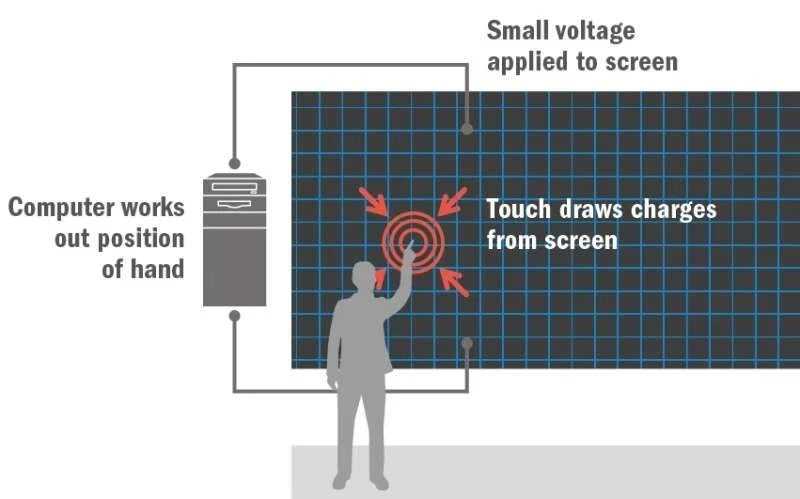
Figure 2: A graphic of a capacitive touch sensor [7].
Resistive Touchscreens
Resistive touchscreens use two layers of material coated in a resistive substance, and when pressure is applied to the screen, the layers touch. These touchscreens tend to be cheaper than capacitive sensors, are more robust against grime and electronic interference, and can be used by anything that can apply a sensor. However, they are an older technology and have less clarity (precision of the pressed location) than capacitive touchscreens. These are common in point-of-sale systems and industrial applications [5, 6].
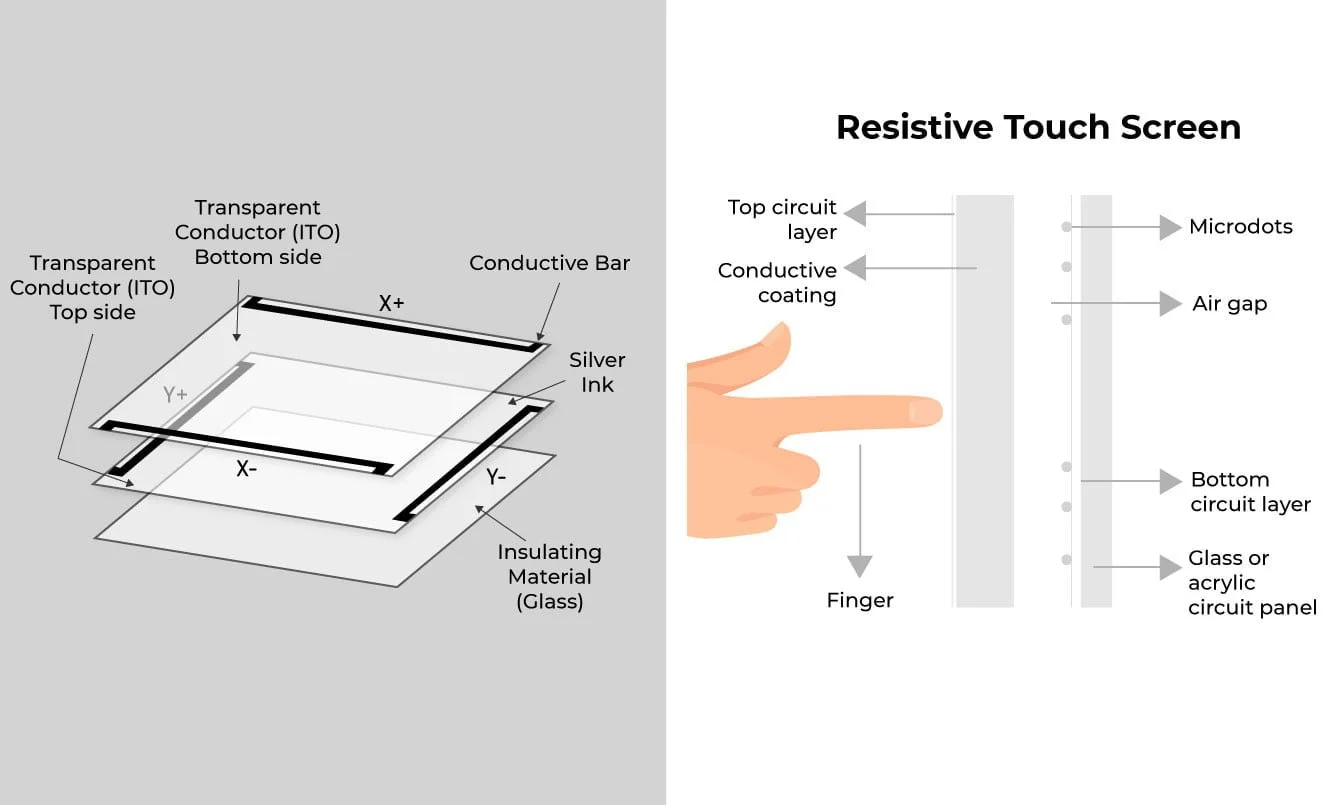
Figure 3: A diagram of a resistive touchscreen [8].
Infrared Touchscreens
For infrared touchscreens, a grid of infrared LEDs and photodiodes are placed around a screen. A user’s interaction with the screen interrupts the infrared signal, allowing the location of the touch to be pinpointed. They are accurate, reliable, do not distort the image quality, respond quickly to touch, are suited for large displays, and are not impacted by electromagnetic interference [9]. They can be affected by direct sunlight and dust, so they are typically reserved for indoor uses, as the number of sensors needed is substantial in order to be accurate, and so the bezel (the frame holding the device together) is larger [5, 8-9].
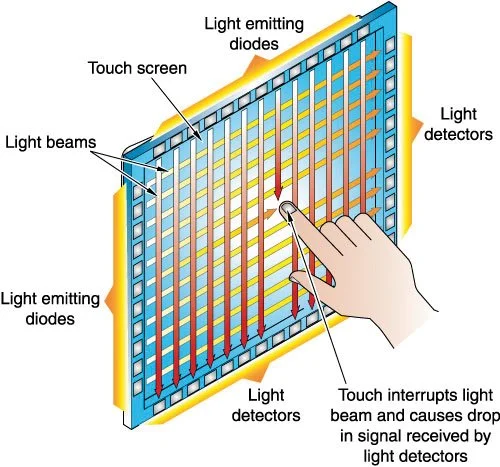
Figure 4: A diagram of an infrared touchscreen [10].
Surface Acoustic Wave Touchscreens
Surface Acoustic Wave (SAW) touchscreens emit ultrasonic waves across the screen. When the screen is touched, the energy is absorbed, and the location of the touch is determined. They have many of the same benefits and limitations of infrared touchscreens, being better for large, indoor uses and complex graphics. These touchscreens make use of transducers to send and receive electrical signals, making these screens sensitive to electronic interferences [5, 8, 11].
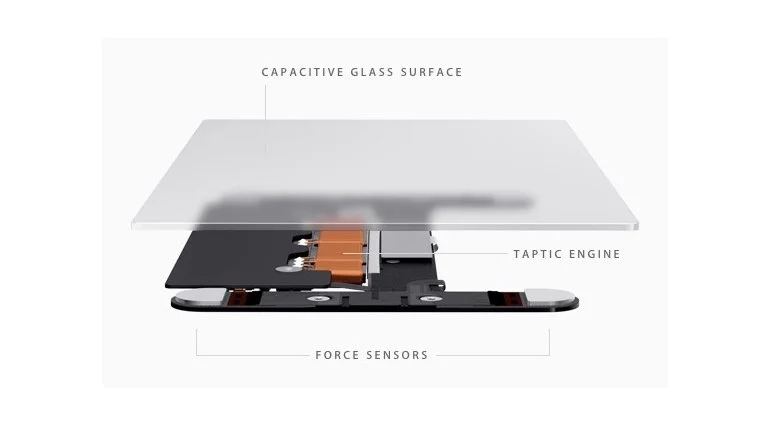
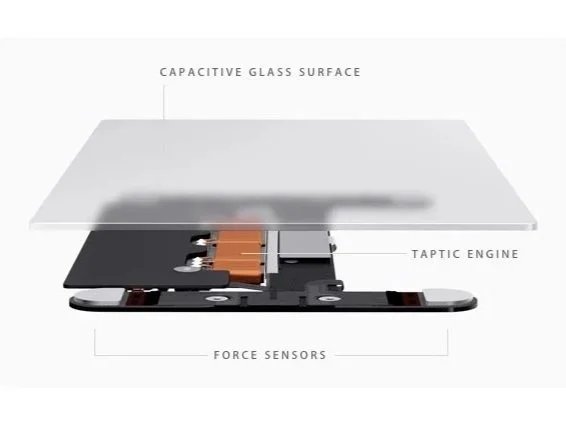
Figure 5: An exploded view of the Mac computer touch pad [12].
Touch Pads and More
The technology that powers touch-based interaction is used in more than simple touchscreens. Capacitive and pressure-based systems are used in the Mac touch pad, for example [12]. Another example includes touch panels, which use optical sensors to determine what part of the panel has been touched [13]. There are even virtual laser keyboards [14]. All of these technologies take the basic principles of the touchscreen, which we have become intimately familiar with as a society, and implement them on technologies that stretch the boundaries of touchscreens.
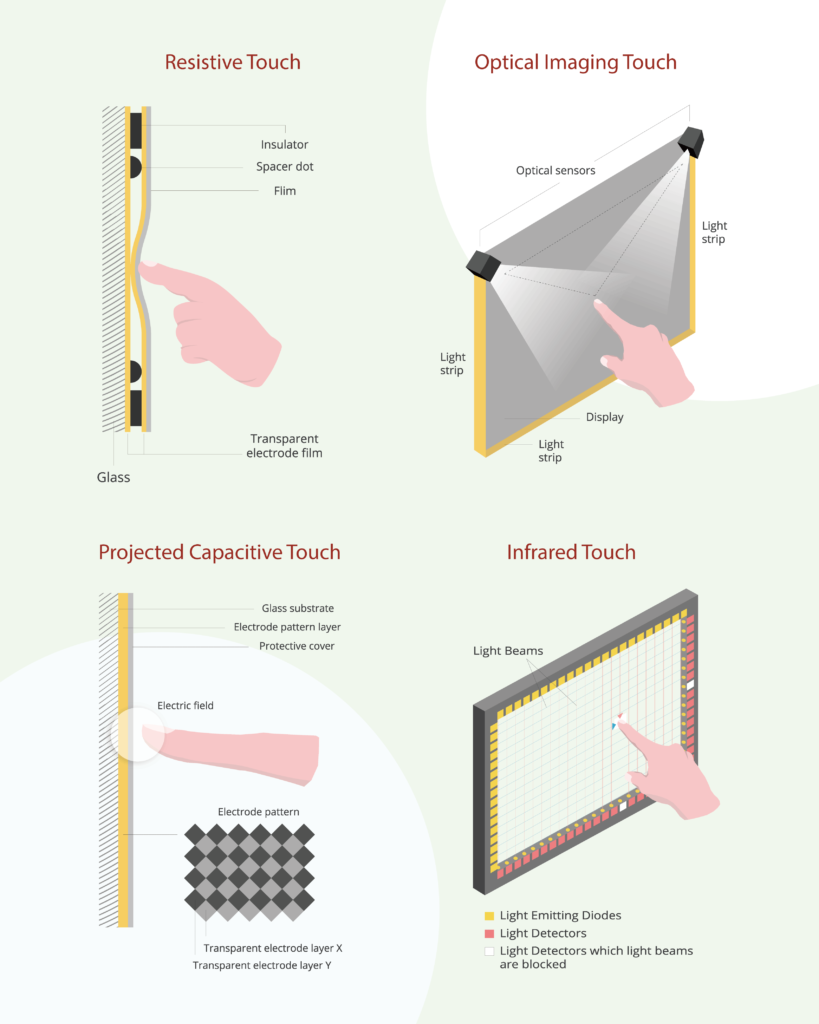
Figure 6: A comparison of touch screens and an optical touch panel (top right) [13].
The Future of Touchscreens
Beyond touch-based technologies, the future of digital interfacing has exciting new developments. Some of these include proximity capacitive sensors that do not require a complete touch, LiDAR technology that can interpret hand motions, and Google’s radar-based gesture sensing technology [15-17]. Haptic technology, flexible screens, and 3D touchscreens are also in development [18]. AI is powering predictive touch screens as well, which respond faster and anticipate a user’s intended action [19-20]. Increasingly, including for hygienic reasons, the world is moving towards touchless technologies [1]. Haptic technologies are particularly interesting, as they allow the user to “feel” an object synthetically.
Touchscreens have revolutionized the way that we interact with the digital world. Their various forms enable us in the modern world to interface with technology as never before. As this technology continues to develop, it will further ingrain itself in our lives.
References
[1] “The Evolution of Touchscreen Technology.” MicroTouch, microtouch.com/the-evolution-of-touchscreen-technology/. Accessed 16 Mar. 2026.
[2] “Ten Benefits of Touchscreen Technology.” TouchSource, touchsource.com/ten-benefits-of-touchscreen-technology/. Accessed 16 Mar. 2026.
[3] “How Touch Screens Help Organizations Improve Efficiency and Productivity.” BizTech Magazine, 13 Dec. 2023, biztechmagazine.com/article/2023/12/how-touch-screens-help-organizations-improve-efficiency-and-productivity.
[4] “History and Evolution of Touchscreen Technology.” St. Norbert College, compsci04.snc.edu/cs225/2010/touchScreen/history--evolution.html. Accessed 16 Mar. 2026.
[5] “How Do Touch Screens Work?” HP Tech Takes, HP Development Company, www.hp.com/us-en/shop/tech-takes/how-do-touch-screens-work. Accessed 16 Mar. 2026.
[6] “Types of Touchscreens: History and Working Principles.” Riverdi, riverdi.com/blog/types-of-touchscreens-history-and-working-principles. Accessed 16 Mar. 2026.
[7] “Touchscreens: Technology in Our Lives.” Institute of Physics, www.iop.org/explore-physics/physics-around-you/technology-our-lives/touchscreen. Accessed 16 Mar. 2026.
[8] “How Does a Touch Screen Work?” Riverdi, riverdi.com/blog/how-does-a-touch-screen-work. Accessed 16 Mar. 2026.
[9] “Infrared Touch Solutions.” TSItouch, tsitouch.com/solutions-infrared/. Accessed 16 Mar. 2026.
[10] “Custom Touch Screen Monitors: Infrared Touch.” Canvys, www.canvys.com/custom-touch-screen-monitors/touch-screen-infrared-touch/. Accessed 16 Mar. 2026.
[11] “How Do Touch-screen Monitors Know Where You’re Touching?” HowStuffWorks, computer.howstuffworks.com/question716.htm. Accessed 16 Mar. 2026.
[13] “Touch Panel Types Explained.” ViewSonic Library, www.viewsonic.com/library/business/touch-panel-types-explained/. Accessed 16 Mar. 2026.
[14] “How Does a Virtual Laser Keyboard Work?” Elex Explorer, 30 May 2021, elexexplorer.com/2021/05/30/how-does-a-virtual-laser-keyboard-work/.
[15] “Capacitive Proximity Sensors.” SolisPLC, www.solisplc.com/tutorials/capacitive-proximity-sensors. Accessed 16 Mar. 2026.
[16] “A Complete Guide to LiDAR Interactive Systems and Applications.” PoeLiDAR, www.poelidar.com/a-complete-guide-to-lidar-interactive-systems-and-applications/. Accessed 16 Mar. 2026.
[17] “Google’s Soli Radar Chip Is Finally Ready for the World.” Wired, 2022, www.wired.com/story/google-soli-atap-research-2022/.
[18] “Future Touch Screen Technology: Beyond the Glass and Into the Air.” In-Air Space, inairspace.com/blogs/learn-with-inair/future-touch-screen-technology-beyond-the-glass-and-into-the-air. Accessed 16 Mar. 2026.
[19] “Touchscreen Technology Overview.” Golden Margins, goldenmargins.com/touchscreen/. Accessed 16 Mar. 2026.
[20] “AI Touch Screen Interfaces: Reshaping Human-Computer Interaction.” In-Air Space, inairspace.com/blogs/learn-with-inair/ai-touch-screen-interfaces-reshaping-human-computer-interaction. Accessed 16 Mar. 2026.
To cite this article:
Conover, Dylan. “Explained: How Touchscreens Work.” The BYU Design Review, 16 March 2026, https://www.designreview.byu.edu/collections/explained-how-touchscreens-work.